GPS, Maps Driving Directions
- 3.9
- Rating
- 5.00M
- Installs
- Free
- Price
 Analysis by App-foxy
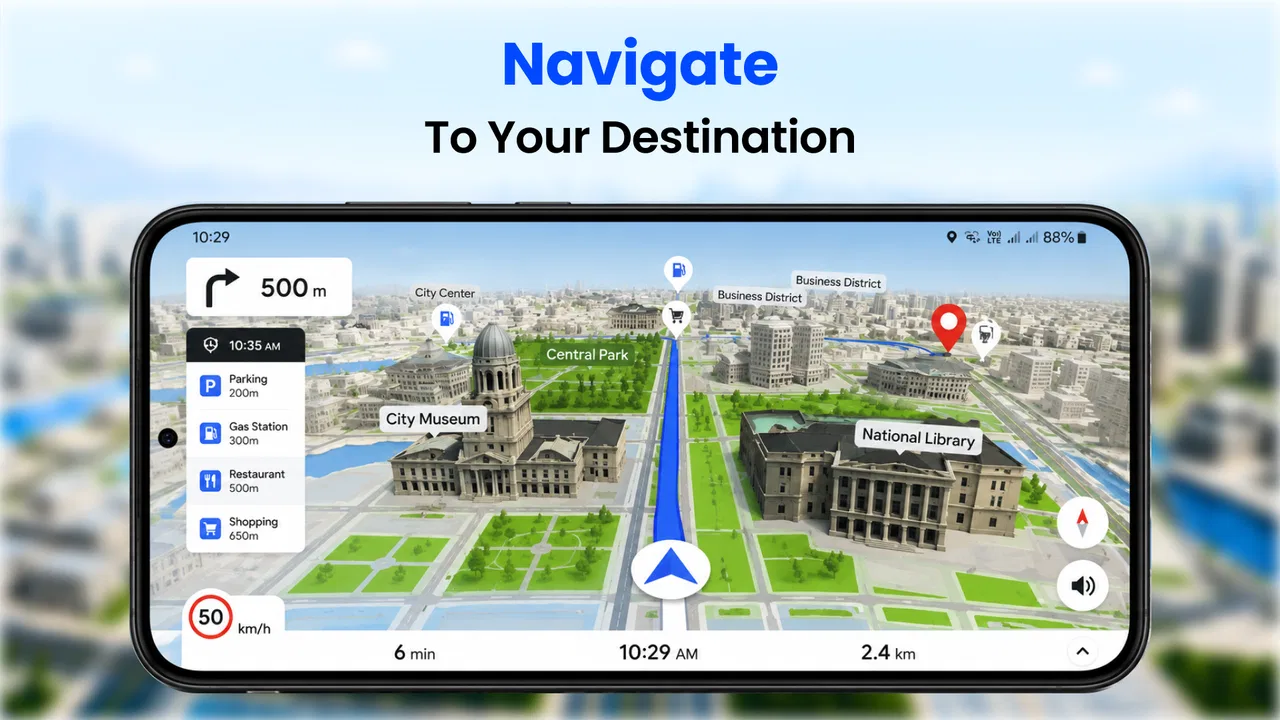
GPS, Maps Driving Directions is the kind of navigation app I reach for when I want a straightforward route without turning the experience into a complicated planning session. It sits in the Maps & Navigation category and comes from MAPIDIRECTIONS STUDIOS. In my everyday use, its appeal is simple: enter a destination, check the suggested journey, and keep an eye on the road while the phone handles the directional work.
The app is free to download, which makes it easy to try before deciding whether it deserves a permanent place on your phone. It is rated for Everyone, runs on devices using Android 10 or later, and the current version is 1.0.75. There are optional in-app purchases ranging from $1.99 to $15.99 per item, so I would still look through the available options before assuming every part of the experience is included at no cost.
What makes this app worth considering is not that it replaces every major navigation service. It does not need to. Its more useful role is as a practical GPS companion for ordinary trips, quick route checks, and situations where I want map guidance in a focused interface. The important question is how well that simplicity holds up when the phone has a weak connection, limited data, or trouble locating the device.
You May Also Like

 Blood Strike: 2.5 Anniversary
Blood Strike’s Loadouts Turn Every Drop Into a Tactical Gamble
A close look at Blood Strike’s custom loadouts: how fast access to signature weapons reshapes its battle royale rhythm, rewards preparation, and narrows the gap between fights.

 Pandora - Music & Podcasts
Pandora’s Music Is Easy to Start, but Harder to Recover
Pandora’s strength is its low-effort path from a seed to a station. Its weak spot is how much confidence it asks you to place in connection, setup, and quiet recovery.

 8 Ball Pool
 Is Built on Rivalries, Rematches, and Routine
A close look at the rivalries, rematches, shared routines, and unanswered safety questions that turn a quick pool match into a persistent mobile community.

 Samsung Music
’s Quiet Strength Is Playing What You Already Own
Its reach comes less from spectacle than from dependable access to a personal library. That simplicity is both the app’s strongest retention engine and its ceiling.

 AccuWeather: Weather Radar
AccuWeather Review: A Quick, Clear Forecast for Everyday Decisions
For everyday plans, the best forecast is the one you can understand quickly. AccuWeather makes rain timing, radar, and local conditions easy to act on, with a few trade-offs.

 Hill Climb Racing
Why Hill Climb Racing Still Turns Crashes Into One More Run
A tiny car, a bumpy hill and one more upgrade: Hill Climb Racing keeps resurfacing because its simple chaos makes every near-miss feel personal.
More From Our News Desk



How the connection changes the navigation experience
Before I begin a route, I like to think about which parts of the trip depend on a steady connection and which decisions I can make ahead of time. That small distinction helps me use GPS, Maps Driving Directions more calmly, especially when a journey includes unfamiliar streets or a weak-signal stretch. From there, the next useful question is how the app fits into the rest of a trip, including the moments when I need to switch attention back to the road or another tool.
When the network is doing the heavy lifting
A navigation app can feel effortless when the phone has a reliable mobile connection. I can search for a place, request directions, and begin moving without much preparation. With GPS, Maps Driving Directions, that connected moment is the natural starting point: the app is most comfortable when it can receive the information needed to build or refresh a route while I am using it.
That matters more than it may sound. A route is not just a line between two points. The destination search, map display, positioning, and any route changes all depend on a smooth exchange between the phone and the services behind the app. If I am leaving a familiar neighborhood, this usually feels uncomplicated. If I am moving through a busy area with several possible turns, the value of a live connection becomes much clearer because I can check the route as conditions change.
I would not treat the app as a reason to ignore basic preparation. Before leaving, I like to enter the complete destination while I still have a strong signal, inspect the general direction, and make sure the phone has enough battery for the journey. This is especially useful for people who travel through underground roads, rural stretches, large parking areas, or buildings where a connection can become unpredictable.
The practical lesson is to begin connected rather than assume the connection will remain perfect. That is not a criticism aimed only at this app; it is a sensible habit for any navigation tool that relies on current map and route information. The difference is that a simple app can encourage a quick start, so it is easy to forget that a few seconds of preparation may prevent frustration later.
A realistic trip with several stops
Imagine leaving work to collect a friend, stop at a pharmacy, and then drive home. I would use the app first for the main destination, then pause before moving to the next stop instead of repeatedly changing the route while driving. That workflow keeps the screen focused and reduces the temptation to handle too many decisions in motion.
For this kind of errand, I find the app more useful as a sequence of short navigation checks than as a complete travel planner. I can confirm the next destination, start moving, and reassess when I arrive. This is a small but important distinction: people who want extensive itinerary management may prefer a more feature-heavy alternative, while people who mainly need directions from one place to another may appreciate the lighter approach here.
Another useful habit is to check the final approach before starting. Addresses can lead to a large complex, a side entrance, or a road with several nearby access points. Looking at the destination area while connected helps me understand where the route is trying to take me, rather than waiting until the last turn when the surroundings are unfamiliar.
Using it away from a desk
This app is designed for mobile situations, so the quality of the experience depends partly on how carefully I use it while moving. I prefer to set the destination before driving, place the phone where it can be viewed without blocking the road, and avoid making manual changes once the vehicle is in motion. The app can provide guidance, but it cannot remove the need for safe attention and sensible phone handling.
It is also useful for walking and short local trips, although I would judge it differently in those situations. A driver mainly needs timely turns and a clear sense of direction. A pedestrian may care more about entrances, crossings, building access, and the exact final approach. When I use a navigation app for walking, I allow extra time to compare the map with what I can see around me, especially in shopping districts or large public areas.
For cyclists, the decision is even more personal. A route that looks reasonable for a car may not feel comfortable on a bicycle, and a route that works for walking may be too slow for a rider. I would use GPS, Maps Driving Directions to understand the general path, but I would not assume that a displayed route automatically matches my preferred traffic conditions or road comfort.
What happens when the signal weakens
The most important limitation is the part many people discover only after leaving a strong coverage area: connectivity can shape what the app is able to do at that moment. I would not rely on GPS, Maps Driving Directions as though every destination, map detail, or route adjustment were guaranteed to remain available without a connection. The safe approach is to prepare while online and treat weak coverage as a situation requiring patience and backup awareness.
There is a difference between the phone knowing its position and the app receiving everything needed for a fresh route. GPS positioning and network-based map services are not the same thing. A phone may still show movement while the route, destination search, or map information is slow to update. Understanding that distinction helps explain why a navigation screen can appear partly responsive while still failing to provide the next useful instruction.
When the connection becomes unreliable, I avoid repeatedly tapping search or restarting the app. That can make a simple delay feel like a complete failure. Instead, I check whether the destination was entered correctly, wait briefly in a safe place if possible, and use visible road signs or local knowledge to continue toward a recognizable point. Once the connection improves, I can reassess the route rather than trying to solve everything while moving.
Recovery after a wrong turn or interruption
Every navigation app has to deal with ordinary mistakes: a missed exit, a closed road, an accidental swipe, or a phone that briefly loses service. My preferred recovery method with this app is deliberately simple. I stop making changes while driving, find a safe place to pause, confirm the destination again, and request the route from my current position if necessary.
This approach is more reliable than assuming the original route will always recover exactly as expected. A navigation app is a guide, not a guarantee that the road situation has stayed unchanged. If I have already deviated, I want to know what the next sensible connection to the destination is, not stubbornly follow an earlier plan.
Phone interruptions deserve attention too. A call, low battery warning, or accidental screen lock can break the flow of guidance. I usually begin a trip with the display settings and battery level in mind, then keep the phone accessible without holding it. If the app is being used in a car, a proper mount is far more useful than trying to balance the phone in a cup holder or glance down repeatedly.
For unfamiliar journeys, I also write down or remember one broad landmark along the route. That is not a replacement for navigation, but it gives me a recovery point if the screen becomes unavailable. For example, knowing the name of the main district or highway I am heading toward can prevent a temporary app problem from becoming total confusion.
Keeping mobile data use sensible
People often ask whether a navigation app will consume a lot of mobile data. The honest answer depends on how often the map is refreshed, how long the trip lasts, how much searching I do, and what other apps are active. I would not promise a fixed amount for GPS, Maps Driving Directions because real use varies. Still, a few habits make the experience more predictable.
I search for destinations before pulling away, avoid repeatedly zooming and panning around large areas, and do not leave the map running unnecessarily after arriving. If I am checking several possible addresses, I do that while stationary and connected to a trusted network when available. This is particularly useful for people with limited mobile data or those traveling internationally.
There is also a privacy-minded reason to avoid unnecessary searching. Typing the same destination several times, browsing broad areas without a purpose, or constantly changing routes creates more network activity than a focused trip. I prefer to decide the destination first, verify the route once, and let the app handle the journey rather than treating the map as a general browsing tool.
Travelers should be especially careful before crossing borders or entering places with expensive roaming. I would check my phone plan, prepare the destination while still on a normal connection, and keep a basic alternative such as written directions or a familiar landmark in mind. The app is free to download, but mobile network costs are controlled by the phone plan, not by the download price.
Where it fits beside familiar alternatives
The usual alternatives in this category often compete through a larger ecosystem: traffic information, business listings, public transport planning, saved places, street-level imagery, or deep account integration. GPS, Maps Driving Directions feels more appropriate when my priority is a direct route and a relatively uncomplicated starting point.
That simplicity can be a strength for someone who finds larger map platforms crowded. A person who mainly drives to appointments, shops, friends’ homes, or occasional unfamiliar addresses may not need a long list of extra layers. On the other hand, someone who depends on detailed live traffic decisions, extensive place reviews, complex multi-stop planning, or specialized transport information may be better served by a more established all-purpose map platform.
I would also compare it with the navigation already built into a vehicle or phone. Built-in systems can be convenient because they integrate with the dashboard, audio controls, or vehicle display. This app is more flexible for someone who changes phones or wants a separate navigation option, but that flexibility may not matter to a driver who already has a system they trust.
The app’s reach is notable: it has passed five million installs, carries an average rating of four point zero from around fourteen thousand ratings, and has about one and a half thousand written reviews. Those figures suggest a substantial audience and a generally positive reception, but they do not remove the need to judge it against personal requirements. A popular app can still be the wrong choice for someone who needs specialized route planning or a particular connectivity workflow.
Who should try it, and who should skip it
I think GPS, Maps Driving Directions is a good fit for casual drivers, students, families, and anyone who wants a free starting point for everyday directions. It is also sensible for people who prefer to keep navigation separate from a larger social or travel platform. The Everyone content rating makes it suitable for a broad audience, although younger users should still follow sensible rules about using phones near roads.
I would recommend trying it if your usual trips are reasonably straightforward and you are comfortable checking the route before departure. It can be especially handy as a secondary navigation option when your main app feels overloaded or when you want a quick route lookup without browsing through unrelated information.
I would skip it as my only navigation solution if I regularly travel through areas with unreliable connectivity, need highly specialized transport directions, depend on detailed traffic intelligence, or plan complicated journeys with many stops. In those cases, a service with the specific offline, traffic, transit, or itinerary tools you require may be a better match. The key is not whether this app can open a map; it is whether its connected, focused style matches the way you travel.
My connectivity verdict
After using GPS, Maps Driving Directions as a practical route tool, I see its strongest quality in its directness. It is easy to understand why someone would open it: choose a destination, follow the route, and keep the trip moving. The free entry point and broad device compatibility make experimentation easy, while the current version shows that the app remains available for modern Android users.
Its main trade-off is that I would plan around connectivity instead of assuming the app will solve every network problem for me. Search and route preparation are best handled before departure, and weak coverage calls for a calm recovery plan rather than repeated tapping. That is a reasonable compromise for ordinary connected travel, but a serious consideration for remote journeys or expensive roaming situations.
MAPIDIRECTIONS STUDIOS has produced an app that makes sense as a focused navigation companion rather than an all-purpose travel command center. I would recommend it to a friend who wants simple GPS directions for routine driving and is willing to prepare sensibly before setting off. I would point that friend toward a more specialized alternative if offline certainty, advanced traffic decisions, or complex trip organization mattered more than a clean, uncomplicated route experience.
FAQs for GPS, Maps Driving Directions
01Is GPS, Maps Driving Directions available for both Android and iOS?
Yes, GPS, Maps Driving Directions is available for download on both Android and iOS platforms. You can find the app on the Google Play Store for Android devices and the Apple App Store for iOS devices. Make sure your device meets the minimum system requirements for optimal performance.
02Does the app require an internet connection for navigation?
GPS, Maps Driving Directions primarily uses an internet connection to provide real-time updates, traffic conditions, and map data. However, it does offer offline maps in certain regions, allowing you to download maps in advance and navigate without an active internet connection, which can be particularly useful in areas with poor connectivity.
03Are there any in-app purchases or subscriptions?
While GPS, Maps Driving Directions is free to download, it does offer in-app purchases and subscriptions for additional features. These may include ad-free experiences, advanced navigation options, and premium map updates. Be sure to review these options in the app’s settings to decide if any are beneficial for your needs.
04How accurate is the GPS navigation provided by the app?
The app offers highly accurate GPS navigation, leveraging real-time data and satellite positioning. However, its accuracy can depend on factors such as geographical location, weather conditions, and device hardware. Regular updates ensure improvements in map accuracy and navigation reliability, so keeping the app updated is recommended.
05What features does GPS, Maps Driving Directions offer for drivers?
The app provides a comprehensive suite of features for drivers, including turn-by-turn navigation, live traffic updates, speed limit alerts, and lane guidance. Additionally, it supports voice navigation, making it easier to focus on the road. These features are designed to enhance the driving experience and ensure safer navigation.
Pros
- User-friendly interface simplifies navigation.
- Real-time traffic updates save time.
- Offline maps available for no data usage.
- Voice-guided directions enhance safety.
- Frequent updates improve map accuracy.
Cons
- Frequent ads can be distracting.
- Battery usage is quite high.
- Requires large storage space.
- Occasional GPS signal loss.
- Some features behind a paywall.

GPS, Maps Driving Directions
Gallery